What Is the Pause Layer?
The Pause Layer is an optional feature in Axyom that places a short, user-chosen pause in front of the apps where you tend to overspend. You select the shopping, delivery, or trading apps yourself using Apple Screen Time.
When you open one, Axyom invites you to pause first and take a calm minute before you continue. Then you decide whether to go ahead or walk away.
Axyom never sees which apps you chose, your cart, your purchases, or any transaction. The apps you select are represented only through privacy preserving Screen Time tokens.
You choose the apps
The Pause Layer is something you set for yourself. You pick the apps that tend to catch you, the ones where a quick tap turns into a purchase you did not plan. Nothing is chosen for you, and nothing is hidden from you.
Apple Screen Time is the part of iOS that can hold an app behind a short pause. Axyom uses it so the pause you set actually happens, then hands the decision back to you.
You set the pause. You lift it. It is a pause for yourself, not a lock someone else controls.
How the pause works
Open one of the apps you selected, and a short prompt appears first, before the app. You can pause first, or continue if you already know your answer.
Pause first
Tap pause first and Axyom opens a calm screen. The app waits until you decide.
Take a minute
One quiet minute of breathing while the first impulse passes. The minute counts only while you are present, not while the phone sits in your pocket.
Decide with a clear head
Then you choose. It was planned and you continue. You are not sure and you look closer. Or you walk away.
It goes in your Journal
Walk away, plan it, or buy now. Whatever you choose, the amount and the outcome are recorded, and your pause impact adds them up.
This is the automatic version of the pause before you buy method. It is how Axyom helps you stop impulse spending before it happens.
What pause impact means
Pause impact is the running total of everything that went through a pause: the amounts you paused, walked away from, planned, and bought, kept in the currency each pause was recorded in. It is self reported in the app, not a verified bank figure, and Axyom does not connect to your accounts. It is a record of your decisions, including the ones where you went ahead.
It is one of the quiet ways Axyom shows progress. Read what Axyom is.
Private by design
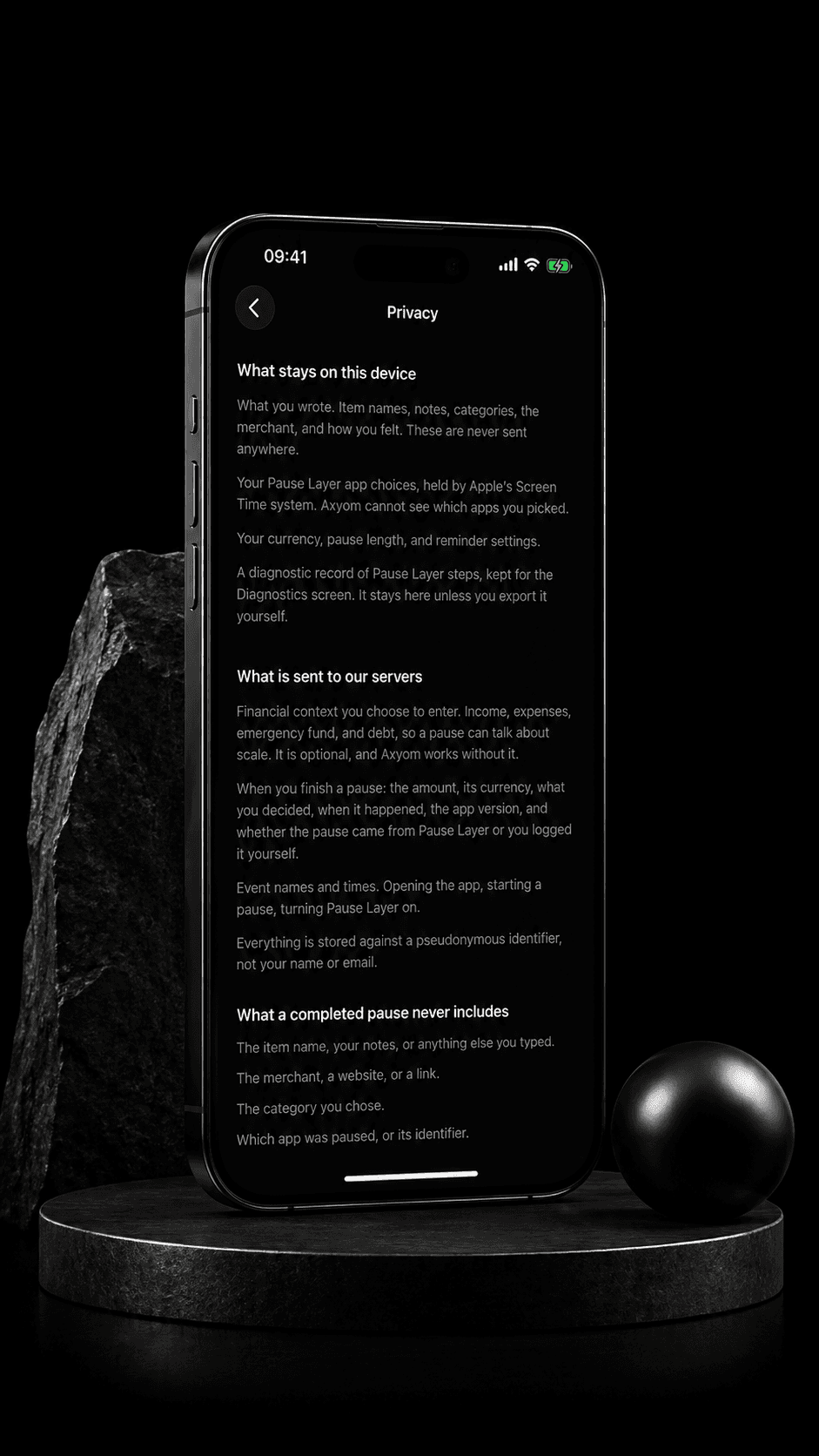
Privacy is the point, not an afterthought. The Pause Layer works without giving Axyom a window into your money or your shopping.
- Axyom has no bank connection and no card linking.
- Axyom cannot see your cart, your orders, your merchants, or any transaction.
- Axyom never learns which apps you selected. They are represented only through privacy preserving Screen Time tokens.
- Your choices stay on your device.
You get the pause without handing over your accounts or your shopping history.
Not a blocker, and not parental control
The Pause Layer does not block bad apps and does not decide for you. There is no app that Axyom judges as good or bad. You choose the apps, you keep full control, and you can always continue.
Parental controls are set by one person to limit another. The Pause Layer is the opposite. You set it for yourself, and only you. It is a pause you asked for, not a restriction placed on you.
People search for this idea as a spending interruption, an impulse buy blocker, or a shopping cooldown. Axyom builds it as the Pause Layer: a pause you set for yourself, never a lock.
Where the Pause Layer fits
The Pause Layer is one way to practice spending interception, the idea of interrupting a purchase before it happens rather than reviewing it after.
It works by keeping the Pre-Commit Window open, the short moment between the impulse and the purchase where the decision can still change.
It exists for the same reason budgets struggle with impulse buys. A budget reviewed at the end of the month cannot reach a decision made in seconds. That is why budgets do not work for impulse spending.
When a purchase does survive the pause, you can still check whether it fits. Use the can I afford this calculator before you buy.
Frequently asked questions
What is the Pause Layer?
The Pause Layer is an optional Axyom feature that adds a short, user-chosen pause in front of the apps where you tend to overspend. You select the apps yourself using Apple Screen Time. When you open one, Axyom invites you to pause for a minute before you decide to continue or walk away.
Does Axyom see which apps I select?
No. Axyom never learns which apps you chose. The apps are represented only through privacy preserving Screen Time tokens from Apple. Axyom also cannot see your cart, your purchases, your merchants, or any transaction.
Is Pause Layer a parental control?
No. Parental controls are set by one person to limit another. The Pause Layer is set by you, for you. You choose the apps, you keep control, and you can always continue. It is a pause you asked for, not a restriction.
Does Axyom connect to my bank?
No. Axyom has no bank connection and no card linking. It does not read your accounts or your transaction history. The money you defend is self reported in the app, based on the purchases you chose not to make.
What happens after the 60-second pause?
After the minute, you decide with a clearer head. You can continue if the purchase was planned, look closer if you are not sure, or walk away. If you walk away, you can note the amount you kept.
Can I still continue if the purchase was planned?
Yes. The Pause Layer never locks you out. If the purchase was planned, you confirm and continue. The pause is there to catch the automatic buys, not to stop the deliberate ones.
Read more
Stop Impulse Spending Before It Happens
The system view of the pause, built into Axyom.
What Is Spending Interception?
Interrupt a purchase before it happens, not after.
The Pause Before You Buy Method
The manual version you can practice on your own.
Why Budgets Do Not Work for Impulse Spending
A month-end review cannot reach a decision made in seconds.
Can I Afford This?
Check whether a purchase fits before you buy.
Set a pause for yourself.
The Pause Layer, built into Axyom.
You choose the apps. You keep control.
Pause first. Then decide.
Free on the App Store. No bank connection.